
What is Multi-Tenant?
The multi-tenant feature lets you manage multiple independent tenants (organizations) under one account. Ideal for:
- Companies with multiple locations or subsidiaries
- IT service providers managing contracts for multiple clients
- Corporations with separate business units
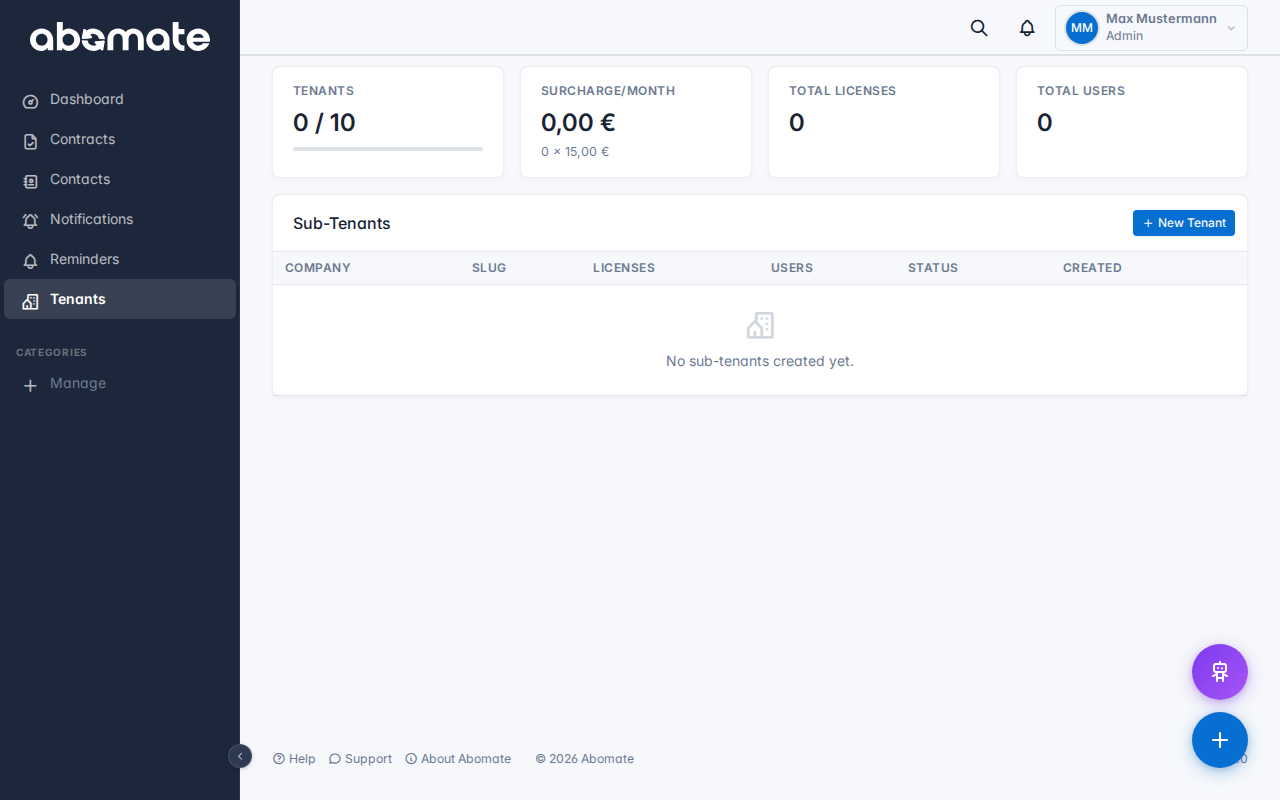
Create sub-tenants
- Go to Tenants in the sidebar
- Click + New Tenant
- Enter company name and slug (URL-friendly short name)
- The new tenant is created immediately – with its own separate database
Switch between tenants
In the topbar you see the current tenant name. Click it to open the tenant switcher. You switch to another tenant without re-login.
Key facts
| Aspect | Detail |
|---|---|
| Data separation | Each tenant has its own database – data is fully separated |
| Admin access | Admins of the main tenant automatically have access to all sub-tenants |
| Own settings | Each sub-tenant can have its own users, categories and settings |
| Tenant limit | Business: up to 10, Pro: up to 50 tenants |
| Cost | €15/month per additional tenant |
Delete sub-tenant
On the tenant management page you can delete sub-tenants. The tenant's database is archived.
Warning: Deleting a sub-tenant cannot be undone. All contracts, users and settings of the tenant are archived.
Availability
Multi-tenant is available from the Business plan (up to 10 tenants). The Pro plan supports up to 50 tenants.